
How StableSecretary built a multi-view scheduling layer that opened new barn market segments
A SaaS platform for equine barn operations chose Mobiscroll to deliver scheduling across multiple views — and grew its feature set incrementally as user requirements expanded.
Patrick , StableSecretary
- Region
- New Hampshire, USA
- Industry
- Equine / barn management
- Key capabilities
- Agenda view, Booking / availability view, Event calendar, Scheduler / scheduling and Timeline
- Customer segment
- B2B
New market segments reached
Sophisticated scheduling unlocked lesson-focused barn operations as customers
Customer booking portal added
Stable clients can view and book available time slots directly
StableSecretary is an all-in-one SaaS platform that helps equine barn businesses manage operations, billing, and horse health records in one place. When the team needed to add a full scheduling capability — one that could handle many participants, event types, and overlapping activities across a working stable — they evaluated DevExpress, Kendo UI, and others before choosing Mobiscroll.
Mobiscroll's breadth of scheduling views, clear documentation, and responsive support team allowed them to ship an initial version in a reasonable time, then keep expanding it as users asked for more. Today StableSecretary uses Schedule, Calendar, Agenda, and Timeline views, plus a customer-facing booking portal — and that depth of scheduling capability has made the platform viable for lesson-focused barns managing high volumes of participants and recurring events.
Running a stable means coordinating a lot of moving parts
StableSecretary is built for barn owners and operators who need to keep a complex business organized: riding lessons, care appointments, farrier visits, billing, and horse health records all in one platform. From the start, the team knew that scheduling — not just a basic calendar, but a capable, flexible scheduling layer — would be central to what the product needed to do.
A working stable involves many people, many event types, and a constant stream of overlapping activities. The scheduling feature had to reflect that reality.
"Look at all vendors, with particular attention to functionality, documentation, and customer support. I think you'll find Mobiscroll to be strong across the board."
Patrick , StableSecretary
A scheduling feature complex enough for real stable operations
Barn management doesn't fit neatly into a simple calendar view. StableSecretary needed to support multiple scheduling patterns at once: structured event views, calendar-based navigation, list-oriented agendas, and resource or time-based layouts — all serving barn staff and eventually their customers too.
Building that range of views from scratch would have been slow and expensive, and the team needed confidence that whatever solution they chose could grow with the product rather than become a ceiling on it. The risk of outgrowing a component library and needing to rebuild was a real concern.
Evaluating the options: functionality, documentation, and fit
The team evaluated DevExpress, Kendo UI, and other scheduling component libraries before settling on Mobiscroll. Functionality was the primary factor: StableSecretary needed a library that covered the full range of scheduling views their users would require, and Mobiscroll's breadth gave them confidence the solution could scale with their roadmap.
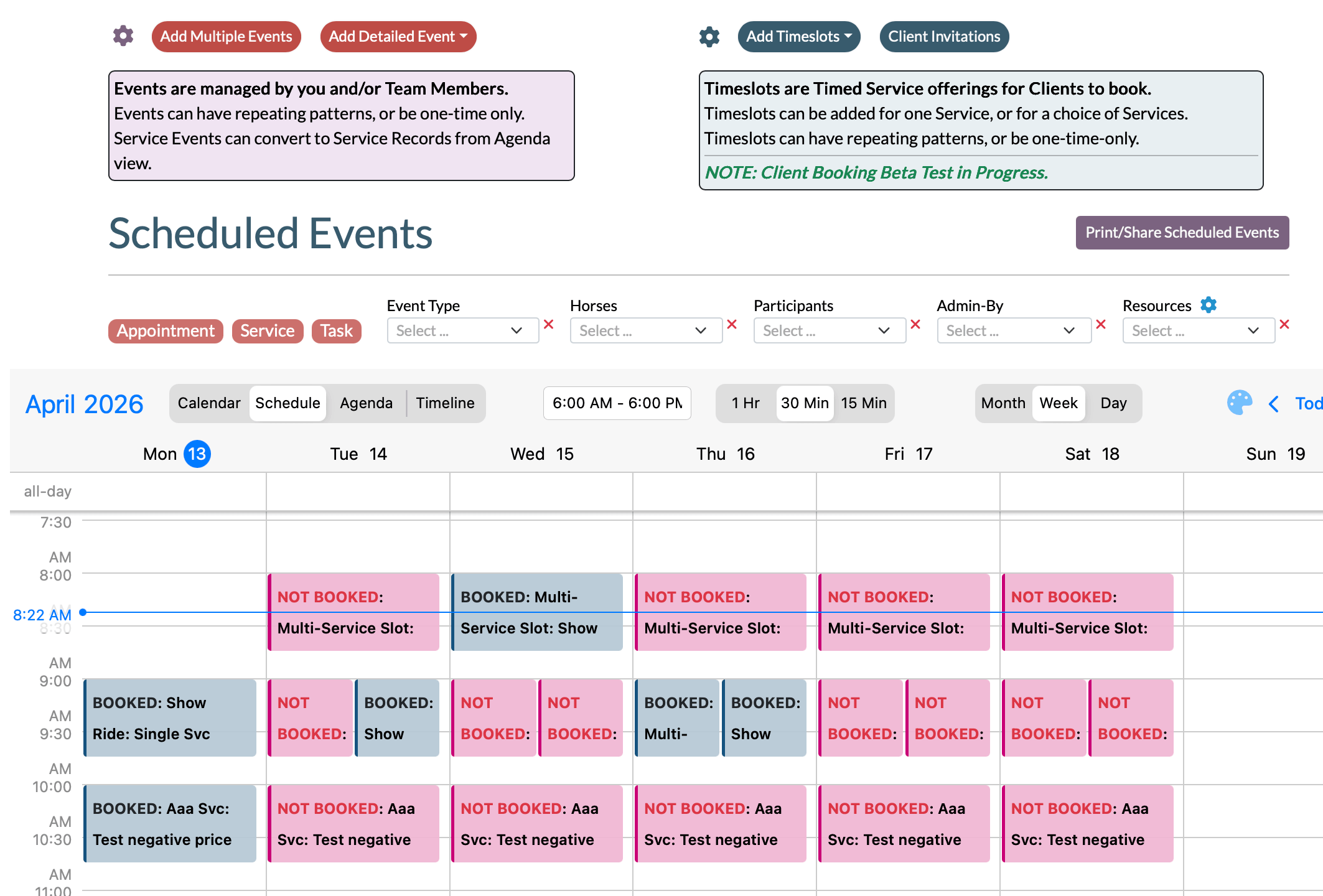
Documentation quality was the second deciding factor — clear, comprehensive reference material meant the team could move through integration without being blocked by gaps in guidance. Pricing also factored into the overall evaluation as a supporting consideration, and the combination of capability depth and commercial terms made Mobiscroll the practical choice.
From first deployment to a full scheduling footprint
StableSecretary shipped an initial version of their scheduling feature in a reasonable time, supported by Mobiscroll's documentation and direct help from the Mobiscroll Support team. Clear documentation and accessible online resources reduced the friction of the initial build; when the team hit unfamiliar territory as requirements expanded, Support provided the technical guidance to keep moving forward.
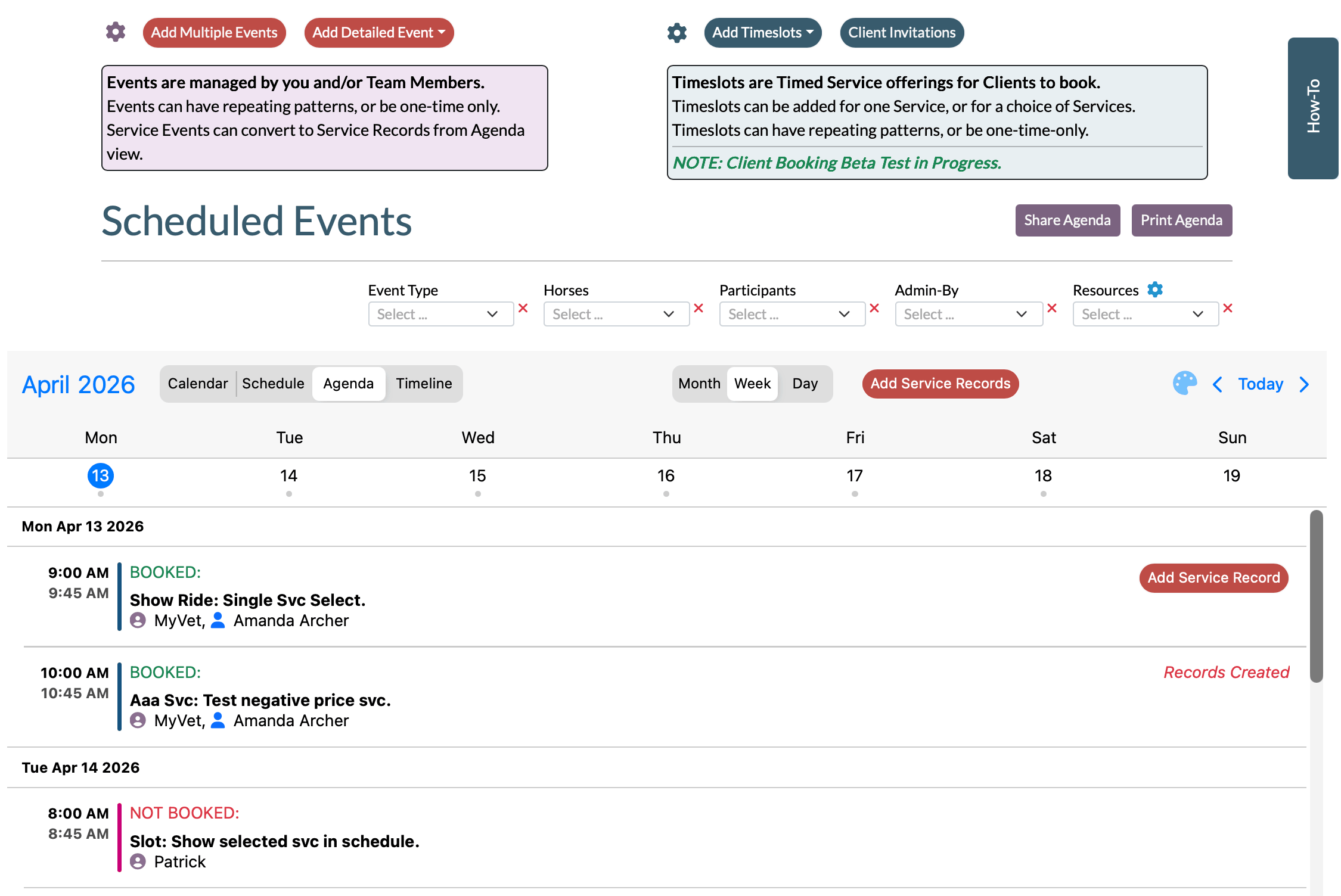
Requirements didn't stop at launch. As users asked for new capabilities, the team added Calendar, Agenda, and Timeline views on top of the initial Schedule view — each time relying on Mobiscroll's documentation and support to work through the learning curve without switching tools. The team also built a customer-facing booking portal, where stable clients can view and book available time slots directly, a user-requested feature the Mobiscroll component set supported without requiring a separate solution.
The depth of scheduling capability that resulted has had a real business effect: sophisticated multi-view, multi-participant scheduling made StableSecretary viable for lesson-focused barn operations — businesses that run high volumes of riding and care lessons for external customers and need exactly the kind of scheduling StableSecretary now provides. That opened a market segment the product wasn't previously positioned to serve.
Start Your Free Trial for Mobiscroll UI
Start a free trialStart your 90-day free trial and get all set up and running smoothly!

"Once we started using Mobiscroll, our conversions have improved and the experience became much more delightful!"